> ## Documentation Index
> Fetch the complete documentation index at: https://docs.aibal.ai/llms.txt
> Use this file to discover all available pages before exploring further.
# Platform overview
> Learn what aibal.ai offers and who it is for
aibal.ai is an AI service platform for developers, content creators, and teams. Start by generating images or videos in your browser, or configure an API key in coding tools, scripts, and your own applications.
Top up your balance, manage API keys, choose available service groups, and review usage records in one account. Open the product at [aibal.ai](https://aibal.ai/).
Available models, service groups, prices, and quotas depend on the current console. Registering does not grant access to every model or make every request free.
## What you can do
| Your goal | Recommended guide | What it covers |
| --------------------------------------------- | ------------------------------------------ | ----------------------------------------------------------- |
| Try AI creation without writing code | [Quick web trial](/en/web-quickstart) | Select a key, enter a prompt, and view the result |
| Create illustrations, posters, or edit images | [Text to image](/en/text-to-image) | Browser instructions, reference images, and API examples |
| Turn an idea into a short video | [Text to video](/en/text-to-video) | Prompts, duration, aspect ratio, task status, and downloads |
| Use AI in coding tools | [Developer integrations](/en/integrations) | cc-switch, Codex, and Claude Code setup |
| Call models from your application | [Create an API key](/en/create-api-key) | Separate project keys and usage limits |
## Your first session
Follow [account registration](/en/register) to set up your email and password, then sign in to the console.
Check the model and service group you need. To add balance, follow [account top-up](/en/recharge) using USDT or a balance redemption code. If you already have service entitlements, check their scope first.
Open **API Keys** and choose a group that supports your intended capability. Use separate keys for different tools or projects.
Start with the [quick web trial](/en/web-quickstart) or a [tool integration guide](/en/integrations). Check the result and usage record before increasing usage.
## Find your way around the console
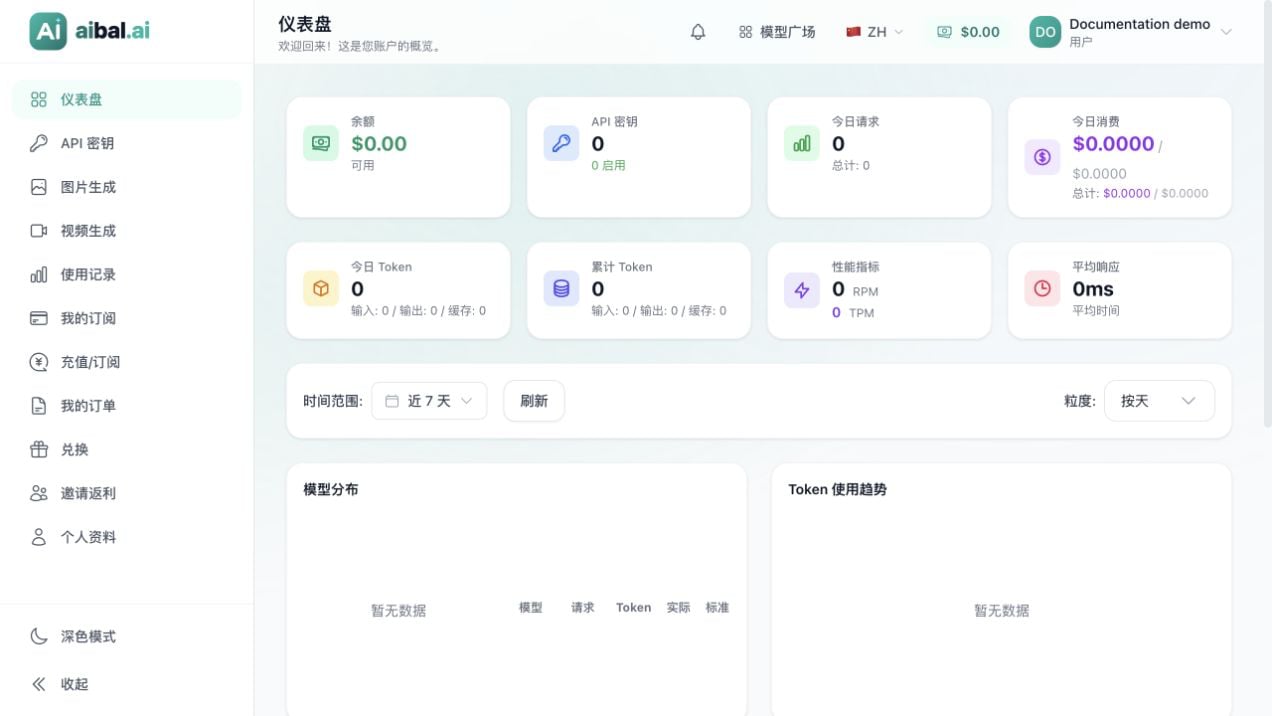 | Page | Purpose |
| --------------------------------------- | ------------------------------------------------------------ |
| **Dashboard** | View balance, request counts, tokens, and cost summaries |
| **API Keys** | Create, copy, and manage keys for your clients |
| **Image Generation / Video Generation** | Submit creative tasks in your browser |
| **Usage** | Review models, usage, and costs using the available filters |
| **Top-up/Subscription / My Orders** | View currently available purchase methods and order status |
| **Redeem / My Subscriptions** | Redeem an existing code and check the resulting entitlements |
## Understand the key terms
* **Account**: signs you in to the website and manages your services.
* **API key**: authenticates client or script requests; it is not your login password.
* **Service group**: defines the services and rules available to a key. Keys in the same account may support different models.
* **Balance and entitlements**: determine the resources available to you. A key can also have its own quota, expiry, and rate limits.
* **Model**: the capability requested by your client. Copy its exact name from the console or the group's integration instructions.
## Common questions
### Do I need to install anything first?
Browser image and video generation only require a browser. Install Codex, Claude Code, or cc-switch when following their respective guides.
### Is this a model provider's official website?
aibal.ai provides its own AI service access point. Its accounts, balance, and API keys are separate from official OpenAI or Anthropic accounts and subscriptions; they do not add entitlements to those accounts.
### Where should I start?
If you do not have an account, [register first](/en/register). If you already have a usable balance and key, open the [quick web trial](/en/web-quickstart).
| Page | Purpose |
| --------------------------------------- | ------------------------------------------------------------ |
| **Dashboard** | View balance, request counts, tokens, and cost summaries |
| **API Keys** | Create, copy, and manage keys for your clients |
| **Image Generation / Video Generation** | Submit creative tasks in your browser |
| **Usage** | Review models, usage, and costs using the available filters |
| **Top-up/Subscription / My Orders** | View currently available purchase methods and order status |
| **Redeem / My Subscriptions** | Redeem an existing code and check the resulting entitlements |
## Understand the key terms
* **Account**: signs you in to the website and manages your services.
* **API key**: authenticates client or script requests; it is not your login password.
* **Service group**: defines the services and rules available to a key. Keys in the same account may support different models.
* **Balance and entitlements**: determine the resources available to you. A key can also have its own quota, expiry, and rate limits.
* **Model**: the capability requested by your client. Copy its exact name from the console or the group's integration instructions.
## Common questions
### Do I need to install anything first?
Browser image and video generation only require a browser. Install Codex, Claude Code, or cc-switch when following their respective guides.
### Is this a model provider's official website?
aibal.ai provides its own AI service access point. Its accounts, balance, and API keys are separate from official OpenAI or Anthropic accounts and subscriptions; they do not add entitlements to those accounts.
### Where should I start?
If you do not have an account, [register first](/en/register). If you already have a usable balance and key, open the [quick web trial](/en/web-quickstart).